


Bespoke web applications
Bespoke web application development for processes that do not fit an off-the-shelf package
Sometimes a website is no longer enough, and a standard package does not quite do what your business needs. That is when I build a bespoke web application: a customer portal, a booking system, a configurator, a dashboard or a complete platform. You work directly with the person who designs and develops it.
- Work directly with Dries
- React, Next.js and Node.js
- My own platforms in production
- From scope to launch
At a glance
What is a web application?
A web application is software that runs in the browser and lets users do something: log in, enter data, make a booking, calculate, order or collaborate. A website informs; a web application performs a task. Nothing needs to be installed, and everyone always works with the latest version.
Bespoke web applications are built around the process of a single business, instead of adapting the process to existing software. At MadeByDries, Dries Nijs designs and develops them himself, in React, Next.js and Node.js. A detailed explanation with examples can be found in the article What is a web application?
The choice
When should you choose a bespoke web application?
Bespoke is not always the right answer. If good off-the-shelf software exists for what you need, it is usually cheaper and available sooner.
When bespoke makes sense
- your process is part of what sets your business apart
- you currently juggle spreadsheets, emails and separate tools side by side
- off-the-shelf software forces you into workarounds or duplicate work
- different systems need to talk to each other
- customers or partners need to be able to track or arrange things themselves
- you want to bring your own product or platform to market
When off-the-shelf software is better
- it is a common process, such as accounting or mailing
- an existing package covers almost everything you need
- you want to start tomorrow, without any development time
- there is no budget for maintenance and further development
Often the best solution is a combination: off-the-shelf software for what is standard, and a bespoke web application for the part that only your business does that way. I then connect the two. The trade-off is explained in Bespoke software or an off-the-shelf package?
Solutions
What bespoke web applications do I build?
The form varies, but the core is the same: a process that requires manual work today becomes an application that takes over the work. These are the types of bespoke web application that most requests fall under. A project is often a combination of two or three of them.
- Customer portals A secure environment where customers keep track of their files, documents, orders or appointments themselves.
- Booking and scheduling Availability, bookings and confirmations in one system, following your business’s own rules.
- Configurators and calculators Visitors put together a product or quote themselves and see the result immediately.
- Dashboards Data from different sources combined in one overview, for you or for your customers.
- SaaS platforms Your own software product with accounts, subscriptions and an admin environment.
- Integrations and API connections Systems that exchange data, so nobody has to retype it any more.
Architecture
What needs to be in place under the bonnet
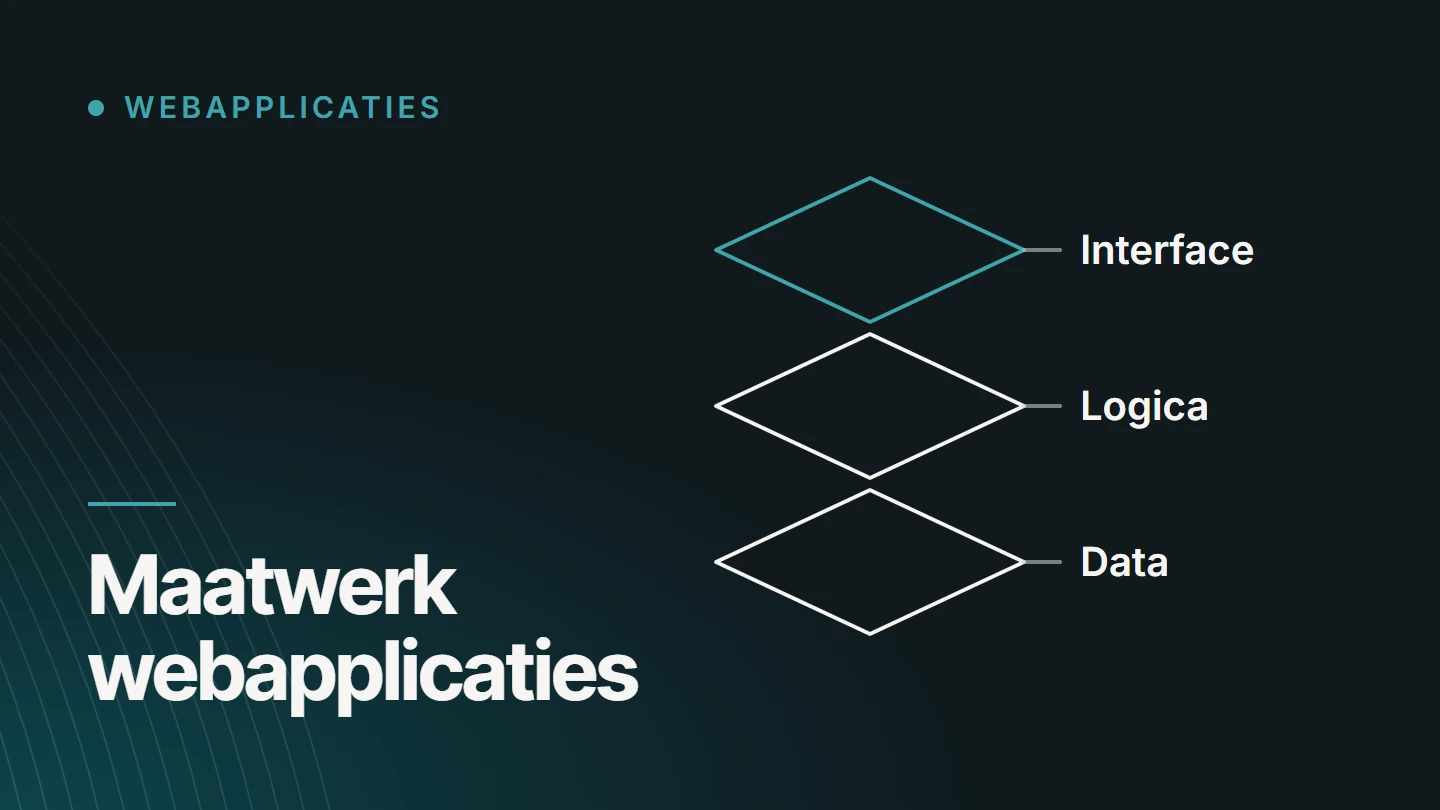
A web application is more than screens. What a user sees is the smallest part of the work. These components determine whether the application keeps working reliably as it grows.
01
Roles and authentication
Who can log in, what each user can see and do, and how that is enforced on the server.
02
Data and workflows
Which data is stored, how it is related and which steps a file, order or booking goes through.
03
Frontend and backend
The interface in the browser and the logic on the server, with a clear boundary between them.
04
Integrations
Payments, email, accounting or other systems, via their API and with a plan for when an integration fails.
05
Visibility of public pages
Anything that needs to be found is rendered on the server, with its own URLs, metadata and structured data.
06
Security
Validating input, checking permissions on the server, encrypted connections and secrets kept out of the code.
07
Performance and growth
A structure that can handle more users and data without a rewrite, tailored to what you realistically expect.
Integrations
API integrations: systems that talk to each other
A web application rarely stands alone. Through an API, it exchanges data with the software you already use, so nobody has to retype it. We define which integrations are needed in the scope.
- REST APIs The standard way for systems to request and send data. The application can also offer its own API.
- CRM Contacts, enquiries and follow-up stay in one place, even when they originate in the application.
- ERP and stock Items, stock and orders stay in sync with the system your business uses for planning and delivery.
- Payments A payment provider handles the payment; the application processes the result.
- Accounting Invoices and payments flow through to the accounting package, without double entry.
- Feeds Importing and exporting product data or listings in a fixed format, at set times.
- Other platforms Email, calendar, maps or an existing website: anything that offers an API can, in principle, be connected.
- Error handling What happens when an external system is slow or goes down is defined in advance.
How an integration works technically is explained in the article API integrations: how systems communicate with each other.
Technology
Why React, Next.js and Node.js?
I build web applications with React for the interface, Next.js for rendering and routing, and Node.js for the logic on the server. That means one language, JavaScript, from the browser to the server: fewer handovers between layers and one person who oversees the whole. These are also technologies with a large community, so another developer can take over the code later.
Next.js lets you choose per page: public pages are rendered on the server and are readable by search engines, while the application behind the login responds like an app. How I keep the public side discoverable is covered under technical SEO. For more on the technology itself, see React and Next.js.
Comparison
WordPress or a web application?
WordPress is made for managing content: pages, articles, products. A web application is made for running a process: users, permissions, data and logic. If your project is mainly about content, WordPress website development is the better and cheaper choice.
If it is about what users do with it, WordPress gets bogged down in plugins that get in each other’s way. The two can also coexist: a website for the content, with the application at its own address.
SaaS platforms
SaaS or a bespoke platform: what is the difference?
SaaS stands for software as a service: software you use on a subscription basis, together with many other customers. You pay monthly, you can start straight away and the supplier decides what the software can do.
A bespoke platform is built for your business: it does exactly what your process requires and you decide on its further development yourself. A third option is to build your own SaaS product and offer it to your own customers. That is also bespoke development, with extra attention to accounts, subscriptions and administration. Which of the three fits depends on how unique your process is and whether the software itself becomes part of your offering.
If you are building your own SaaS platform, these components always come up.
- User accounts Registration, sign-in and a dedicated environment for each customer or organisation.
- Roles Administrators, staff and customers each see and do different things, enforced on the server.
- Dashboards Each user sees their own data and the status of their work in one overview.
- Subscription logic Plans, trial periods and limits as rules in the software. Which plans you offer is a choice within your business model.
- Workflows The steps a task, request or file goes through, with statuses and notifications.
- Data Data from different customers stays strictly separated and can be exported.
- Scalability A structure that can handle more customers and data without a rewrite, tailored to what you realistically expect.
- Administration An admin environment for managing customers, plans and settings.
What exactly a SaaS platform is and when to choose one is explained in What is a SaaS platform?.
Approach
Start with a first version that works
A web application does not have to be finished in one go. I usually recommend starting with the smallest part that already delivers value: one process, one user role, one integration.
That version goes into use, and what users do with it determines what comes next. That way you do not pay for features nobody turns out to use, and you see early on whether the approach is right.
Organic Web
Building a web application with Core. Code. Growth.
I treat design, development and visibility as one system. I call it Organic Web. For a web application, it means three stages.
01
CORE.
First understand the process: who does what, with which data, and where it gets stuck today.
02
CODE.
Then define the architecture and build it, in steps you can test.
03
GROWTH.
After launch, measure how the application is used, and keep developing it.
I usually recommend starting with the smallest part that already delivers value: one process, one user role, one integration.
Projects
Platforms I develop myself
Three platforms of my own: a rental platform, a commerce platform in four languages and a SaaS platform. I am their owner and developer, and I keep them running in production myself. I also developed Fijn Mekaniek Nelissen, a Next.js platform with server-side rendering and a custom backend.
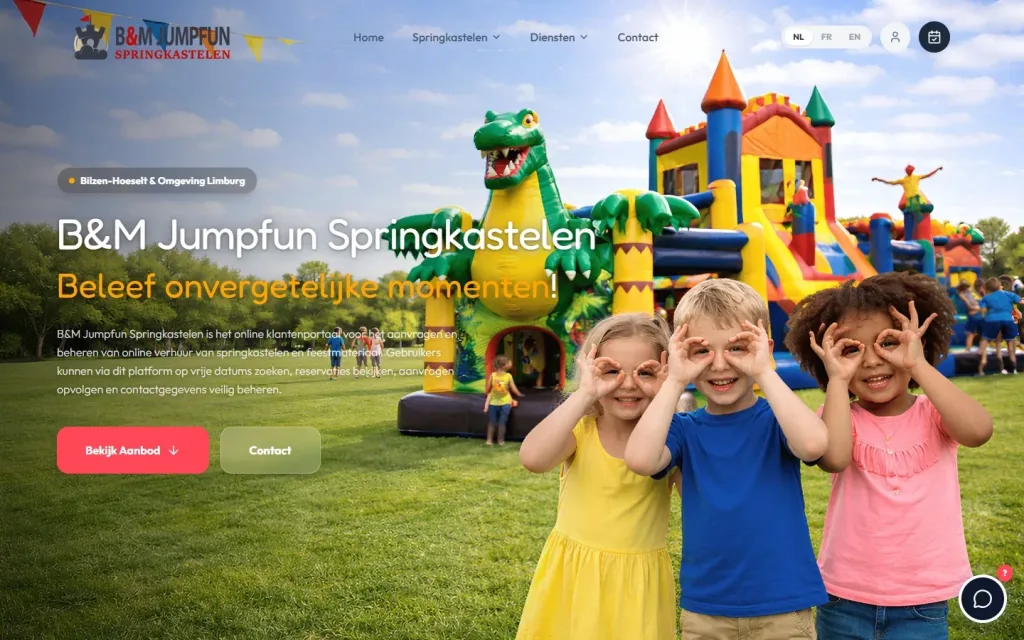
React app · Web application · Full-stack Development
BM Jumpfun
A multilingual React app that brings together the catalogue, bookings, scheduling and administration of a rental business.
- React
- Claude
- GPT
- Gemini
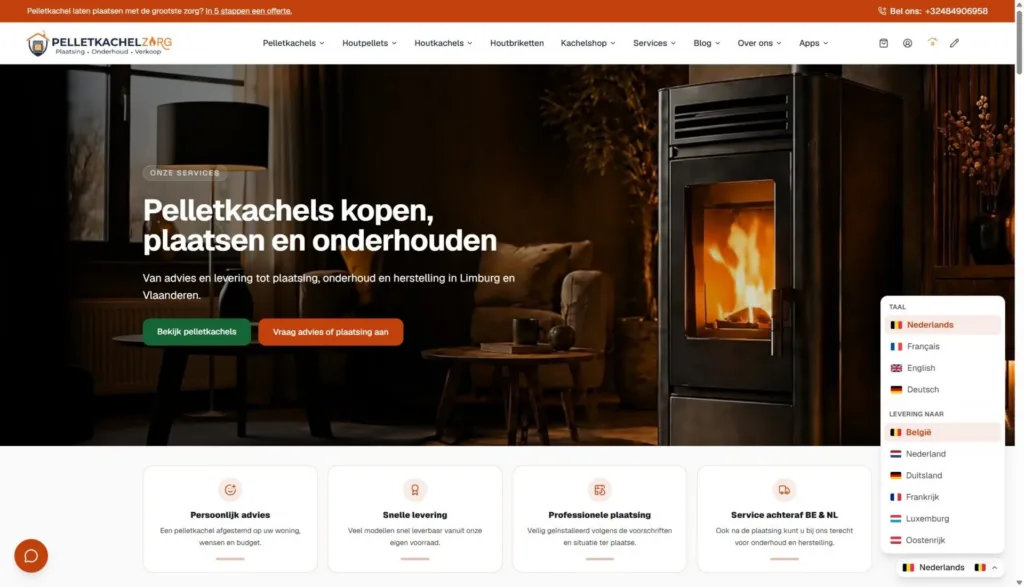
React & Next.js · E-commerce · Organic Web
Pelletkachelzorg
My own commerce platform in React and Next.js for the sale, installation and servicing of stoves, in four languages.
- React
- Next.js
- Claude
- GPT
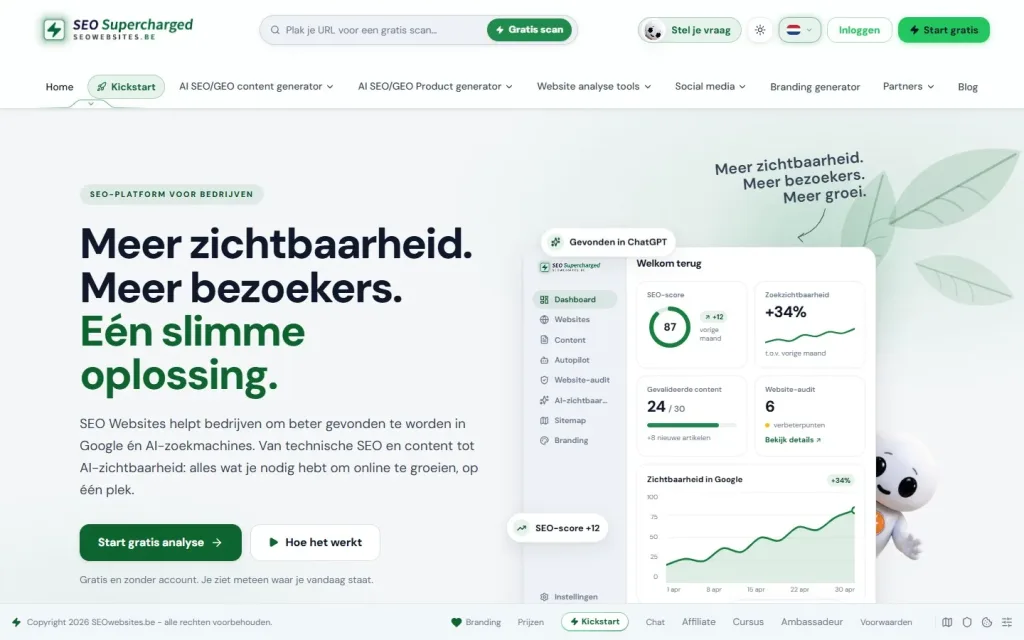
SEO · GEO · Organic Web
SEO Websites
My own SaaS platform for website analysis, SEO content and visibility in search engines and AI systems.
- React
- Node.js
- Express
- Claude
How I work
From scope to launch
I build a web application in stages, so you see something early on and can make adjustments.
I only give a fixed timeline once the scope is defined.
01
Scope
The process, the users and their roles, the data and the integrations. What the first version needs to do, and what comes later.
02
Architecture and prototype
The data model, the technical structure and a clickable design of the most important screens.
03
Build
Development in clearly defined steps, with interim versions you can try out yourself. That way you can make adjustments while changes still cost little.
04
Testing
With real scenarios and real users, including the edge cases: errors, permissions and empty states.
05
Launch
In production, with monitoring and agreements on maintenance and further development.
Pricing
How much does a bespoke web application cost?
For a web application, pricing is on request. Two applications that look the same from the outside can differ greatly in size. I can only give a fair price once the scope is clear. What I can say in advance is that starting with a first version with a limited scope is always an option.
These elements determine the size of the work.
- Roles How many types of user, with which permissions.
- Data How many types of data, and how they relate to each other.
- Workflows The steps, approvals and exceptions in the process.
- APIs and integrations Connections with other systems.
- Payments One-off, by subscription or by invoice.
- Authentication Login, invitations and level of security.
- Admin environment What you need to be able to configure and monitor yourself.
- Real-time features Notifications or data that need to update instantly.
- Deployment Hosting, environments and follow-up after launch.
Why Dries
One developer who oversees the whole
- Direct contact You discuss your process with the person who designs and builds the application.
- My own platforms I develop and manage platforms in production myself, so I also know the phase after launch.
- Frontend, backend and visibility No handovers between teams: one person for the interface, the logic and the public pages.
- Honest about the choice If a website or off-the-shelf software is enough, I will say so.

About the specialist
Dries Nijs, Organic Web Specialist
I am Dries Nijs, a developer and Organic Web Specialist from Maasmechelen. I have been building for the web since the 1990s: first websites, and now web applications and platforms in React, Next.js and Node.js as well. I work alone, and that is a deliberate choice: you always talk to the person who writes the code. MadeByDries is the personal brand under which I work.
FAQ
Frequently asked questions about bespoke web application development
What is the difference between a website and a web application?
A website presents information: who you are and what you offer. A web application lets users do something: log in, manage data, make a booking or calculate. The line is not sharp: a website with a customer area or a configurator is partly a web application.
How much does a web application cost?
That depends entirely on the scope: the number of roles, the data, the workflows and the integrations. That is why I price web applications on request. After a conversation about the process and the first version, I can prepare a concrete quote.
Who can build a web application for me?
A software agency, a freelance developer or an independent specialist. At an agency, a team works on your project, with a project manager as your point of contact. At MadeByDries, you work directly with Dries Nijs, who designs and develops the application himself.
What are API integrations?
An API is an agreed way for two systems to exchange data. An API integration connects, for example, your web application to a payment service, an accounting package or a CRM, so data flows through automatically and nobody has to retype it.
What does SaaS stand for?
SaaS stands for software as a service: software you use via the browser and pay for by subscription, without installing or managing it yourself. You can use SaaS, or have your own SaaS platform built to offer to your customers.
Can you build an app with AI?
AI can write code and produce a simple prototype. For an application a business relies on, the decisions remain human work: the architecture, the security, the permissions and what happens when something goes wrong. I use AI as a tool in development. The decisions and the review remain my responsibility.
Is a web application the same as an app?
Not quite. A web application runs in the browser, on any device, without installation. An app from the App Store or Google Play is built and installed separately. For many uses, a web application that also works well on a phone is enough.
How long does it take to build a web application?
That depends on the size of the first version. A clearly defined application with one role is a different matter from a platform with subscriptions and integrations. I build in stages, so a first usable version does not have to wait for the last feature.
A process that would work better with custom software?
Tell me how it works today, who uses it and where it gets stuck. Then we will look at whether bespoke development is the right choice.