


WooCommerce
Online shop development with WooCommerce, built to sell and to be found
An online shop development project is about more than putting products online. The catalogue, payment, shipping and visibility all have to work together. I design and build online shops in WooCommerce: with a custom design, a product structure that grows with you and a technical foundation that search engines can read.
- WooCommerce on WordPress
- Custom design
- SEO in the product structure
- Work directly with Dries
At a glance
What does online shop development at MadeByDries involve?
Having your online shop built by MadeByDries means that Dries Nijs, a web designer and developer from Maasmechelen, designs and builds your shop in WooCommerce, the e-commerce software for WordPress. You get a custom design, a catalogue with a well-considered product structure, a checkout with the payment methods your customers expect, and shipping rules that suit your logistics.
Visibility is built in: category pages that each answer their own search query, product pages with correct metadata and structured data, and pages that load quickly on a phone. After handover, you manage products, prices, stock and orders yourself.
An online shop starts from € 3,495 excl. VAT. The final quote is based on the agreed scope: a shop with ten products is different work from a catalogue with thousands of items and a link to your stock system.
The choice
When is WooCommerce the right choice?
WooCommerce is open software that runs on your own WordPress website. That gives you freedom, and in return it needs someone who sets it up properly.
WooCommerce is a good fit when
- your online shop and your website need to form a single whole, with the same content and style
- you want to keep ownership of your shop, your data and your hosting
- content plays a role in sales: explanations, advice or a knowledge base
- your products have variants, options or rules of their own
- you want to sell in multiple languages
Look elsewhere when
- you want to start tomorrow with a handful of products and no technology at all
- the shop is really a platform, with accounts, roles and its own processes
- orders need to live entirely in another system
- no one wants to maintain the software, not even an external partner
If your plan matches the first list, I build the online shop in WooCommerce. If the shop is mainly an application with its own logic, bespoke web applications are often the better route. You can read the comparison between the two platforms in WooCommerce vs Shopify.
Catalogue
A product structure that stays consistent
The catalogue is the heart of the online shop. What you define here at the outset determines how easily customers find things and how easily you can manage it.
01
Categories
A structure that follows how customers search, not how the warehouse is organised. Each category gets its own page with its own introduction, so it can also answer a search query.
02
Variants and attributes
I set up size, colour, volume or version as attributes, so one product can have several variants, each with its own price, stock and image. The same attributes power the filters.
03
Product pages
A fixed layout with the information a buyer needs: what it is, who it is for, the specifications, delivery and the questions that keep coming up. You fill in the content; the template safeguards the format.
04
Search and filtering
With a large catalogue, the search function decides sales. Filters on the attributes that matter and, where it makes sense, a custom search tool, such as searching by make and model.
05
Import and management
Existing products can be imported from an export or a supplier list. After that, you manage prices, stock and promotions yourself in WordPress.
Checkout
Payment, shipping and invoicing
The checkout is where a visitor becomes a customer, or drops out. The fewer surprises, the better.
Visibility
SEO, structured data and speed built in
An online shop has more pages than a regular website, and therefore more places where things can go wrong technically. These elements are part of the build.
01
SEO for categories and products
Category pages capture the broad search queries, product pages the specific ones. Each page gets its own title, description and URL. Filters and sorting must not generate an endless series of duplicate pages: I handle that with canonicals and indexing rules.
02
Structured data for products
Markup that tells search engines what the product is, what it costs and whether it is available. It comes directly from the product data, so it matches what the visitor sees. There is more explanation in Structured data and schema markup.
03
Performance
Product photos in the right format, only the scripts a page needs, and caching that takes the basket and customer account into account. I optimise for what a buyer experiences on an ordinary phone. You can read what those metrics mean in Improving Core Web Vitals.
04
Content that helps customers choose
Buying guides, explanations and answers to recurring questions belong in the shop, not alongside it. They bring in visitors who are still comparing, and they give AI systems something to cite.
Integrations
Feeds and integrations
An online shop rarely stands alone. Which integrations are useful and feasible depends on the systems you already use. We look at that for each project, before the quote.
- Product feeds A feed of your products for comparison sites and advertising platforms.
- Stock and ERP Stock and prices from the system where you already manage them.
- Accounting Orders and invoices that flow through to your accounting software.
- Shipping labels Labels and tracking codes directly from the order.
- Email marketing Customers and purchases as the basis for your newsletter.
- Custom rules Tiered pricing, quotes, customer groups or your own ordering model.
Not every integration exists off the shelf. Where an existing plugin works reliably, I use it. Where it does not, I write the integration myself or tell you honestly that a manual step is the wiser choice.
Languages and countries
Selling in multiple languages and countries
In Belgium, an online shop in Dutch and French is often the starting point. Each language gets its own URLs, its own product copy and correct hreflang references, so search engines show the right version. I do not publish automatic translations without checking them. What a multilingual website requires applies here too, with the catalogue on top.
If you sell across borders, other questions arise that have nothing to do with design: VAT per country, shipping zones, return policies and payment methods that vary by market. I set these up technically as you and your accountant define them. I do not give legal or tax advice.
Organic Web
An online shop as part of the whole: Core. Code. Growth.
In an online shop, design, code and visibility are not separate tracks: I treat them as one system. I call that Organic Web, and it runs in three phases.
01
CORE.
First, the offer: what you sell, to whom, and how customers search for your products.
02
CODE.
Then the design and build in WooCommerce, with the catalogue, checkout and technology in one pair of hands.
03
GROWTH.
After launch, keep building: new categories, content and visibility.
How I work
From catalogue to first order
The order is fixed: first the products and the structure, then the design and build. That way, I design for the content that will actually be there.
01
Scope
What you sell, how many products and variants, how you ship and which systems need to be involved. The quote is based on this.
02
Product structure
I define categories, attributes, filters and URLs before the design.
03
Design
A custom design for the home page, category, product, basket and checkout, on mobile and desktop.
04
Build
The build in WooCommerce, with payment, shipping, emails and the technical foundation.
05
Testing and launch
Test orders with every payment method and shipping rule, plus checks on speed and indexability. Then the shop opens.
The rules come from your own logistics: I replicate what you do in practice.
Projects
WooCommerce shops I have built
Three multilingual WooCommerce shops: from a niche product with an adoption scheme to a catalogue of thousands of parts with a search by make and model. On each project, I handled the design, development and SEO.
Web design · WordPress · WooCommerce
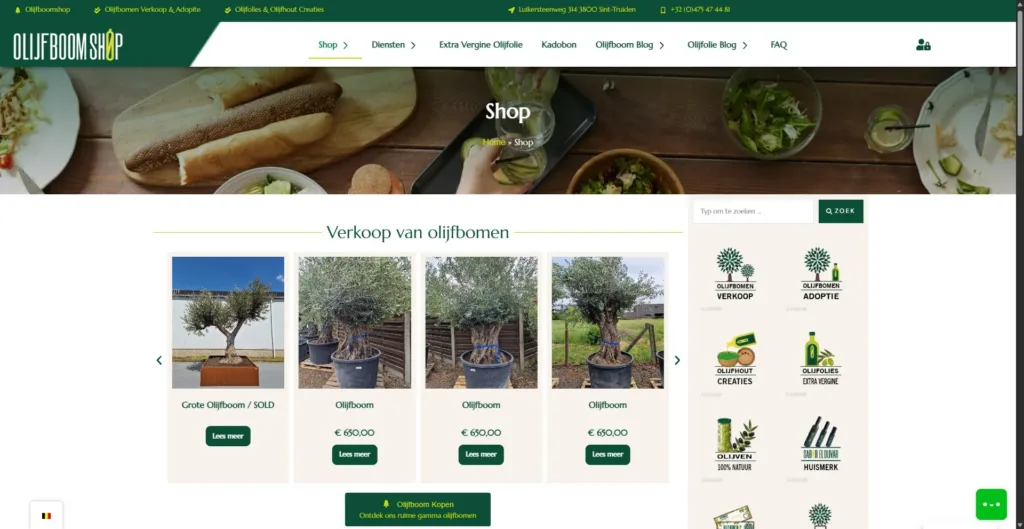
Olijfboom Shop
A WooCommerce shop in four languages, with an olive tree adoption scheme and its own knowledge base.
- WordPress
- WooCommerce
- Mollie

Online shop · E-commerce · Multilingual SEO · SEO
Pelletkachelvoordeel
Multilingual WooCommerce shop for pellet stoves, wood stoves, pellets, briquettes and parts, with quote requests, installer pages and local landing pages.
- WordPress
- WooCommerce
- Mollie
Online shop · E-commerce · Multilingual SEO · SEO
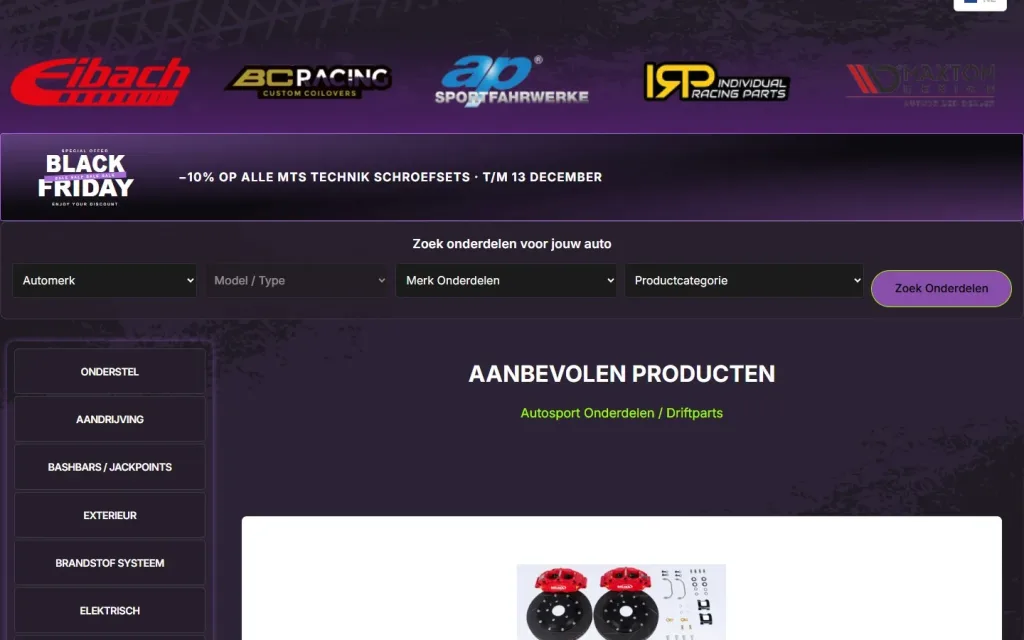
Race4DriftParts
Multilingual WooCommerce shop for drift and motorsport parts, with a vehicle finder by make and model, brand pages and a catalogue of thousands of products.
- WordPress
- WooCommerce
- Mollie
Pricing
How much does an online shop cost?
With me, a WooCommerce online shop starts from € 3,495 excl. VAT. The final quote is based on the agreed scope. It is a one-off project price for the build, not an hourly rate and not a rental plan.
For a complex scope, with integrations, a large import or custom ordering rules, you receive a tailored quote. Once paid in full, the delivered online shop belongs to the client. After launch, there are recurring costs: hosting, licences, maintenance and whatever your payment provider charges per transaction. You can read how website and online shop prices are structured in How much does a website cost?
Are you a manufacturer, importer or wholesaler mainly looking for an extra sales channel, without a project price up front? Then read how selling online on commission works.
- Catalogue size The number of products, variants and categories.
- Import Whether products are added manually, via a file or from another system.
- Design The number of page types with their own design.
- Payment and shipping The number of methods, zones and exceptions.
- Integrations Stock, accounting, feeds or shipping labels.
- Languages and countries Each language and each market needs its own content and rules.
- Custom logic Tiered pricing, customer groups, quotes or your own ordering model.
- Existing online shop Products, customers and URLs that need to move across.
Why Dries
Why have Dries build your online shop?
- One person for design and code What I design, I also build. Nothing gets lost between two parties.
- SEO is built into the structure Categories, URLs and product data are set up to be found.
- Bespoke work where it is needed I write custom search tools, ordering models and integrations myself.
- Honest about the limits If WooCommerce does not suit your plan, I will tell you before the quote.

About the specialist
Dries Nijs, Organic Web Specialist
I am Dries Nijs, and I work from Maasmechelen as a web designer and developer. I have been building for the web since the 1990s, and a large part of that work is WordPress and WooCommerce: multilingual online shops with a custom design, a tailored product structure and technical SEO built into the foundations. MadeByDries is the personal brand under which I work. You can find more about my WordPress work under WordPress specialist.
FAQ
Frequently asked questions about online shop development
Can you build an online shop with WordPress?
Yes. With WooCommerce, a WordPress website becomes a fully fledged online shop, with products, a basket, payments and orders in the same back end. If you do not have a website yet, I build both in one project. See also WordPress website development.
Is WooCommerce free?
The core WooCommerce software is free and open source. An online shop does cost money, though: the design and build, hosting, any paid extensions and your payment provider’s transaction fees. Free software does not mean a free shop.
Which is better, Shopify or WooCommerce?
Neither is always better. Shopify is a closed platform with a monthly fee that lets you start quickly. WooCommerce runs on your own website: you keep ownership, you have more freedom in design, content and SEO, and the software has to be kept up to date. Which one fits depends on your catalogue, your processes and how many custom rules you need.
How much does an online shop cost per month?
The build is a one-off project price. After that, you pay recurring costs for hosting, the domain name, any licences, maintenance and your payment provider’s transaction fees. The amount depends on the size of the shop and the solutions you choose. With me, there is no mandatory monthly rental plan.
Can I manage products and orders myself?
Yes. You add products, adjust prices and stock, set up promotions and follow up orders yourself in WordPress. At handover, I show you how it all works in your shop.
Which payment methods can my online shop offer?
The methods your payment provider supports. Depending on the market, the payment provider and the project, options such as Bancontact, card payments, bank transfer or iDEAL can be integrated. You decide which provider to use and which rates apply. I take care of the integration and the test orders.
Can you simply start an online shop in Belgium?
An online shop is subject to rules covering, among other things, your company number, VAT, consumer law and privacy. These are legal and tax matters on which you should consult your accountant or a business one-stop shop (ondernemingsloket). I build the shop so that the mandatory information, such as terms and conditions and company details, has a clear place.
How do you make sure an online shop is found on Google?
With a structure in which every category and every product answers one clear search query, with correct metadata, structured data and fast pages. Google describes the technical points to watch in its documentation for e-commerce sites. I apply those principles in the build, and they are part of technical SEO.
Who maintains the online shop after launch?
WooCommerce, WordPress and the plugins receive regular updates, and a shop that handles payments should not be left to become outdated. You can do that yourself or have it taken care of. You can read how I approach it under WordPress maintenance.
An online shop that fits what you sell?
Tell me what you sell, how many products you have and how you process orders today.